
People have been talking about it for years. Indeed, the original Star Wars parody Spaceballs set up a sequel called Spaceballs 2: The Search for More Money. We don't know if that will be the actual title, but Spaceballs 2 is coming out in 2027. Mel Brooks himself, who will turn 101 years old in 2027, makes the announcement. Brooks will not direct this time, but he will reprise his role as Yogurt. Rick Moranis is coming out of this 30-year retirement to play Dark Helmet, and Bill Pullman will once again play Lone Starr. In addition, Keke Palmer has been cast, as well as Lewis Pullman, Bill Pullman's son. Their roles are as yet undisclosed. Amazon MGM Studios describes the film as “A Non-Prequel Non-Reboot Sequel Part Two but with Reboot Elements Franchise Expansion Film.” Which tells us nothing, but we'll find out more bit by bit over the next two years.
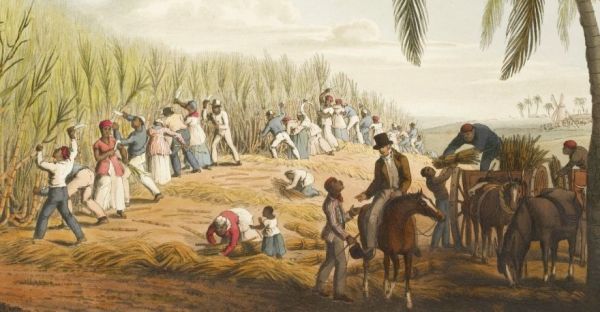


After the American Civil War, there was some attempt to help formerly-enslaved people (40 acres and mule), not so much as compensation, but to help them start an independent life. Sadly, those efforts didn't last long. The intention, though, was a far cry from what happened during the Haitian Revolution, when France demanded that the newly-free Haitians pay French slaveholders as compensation for the loss of their "property." In between those events, Britain abolished slavery in 1833. You don't hear much about how that was settled.
These enslaved people were held in far-flung colonies, while their slaveholders mainly resided back home in Britain. To make the transition smoother, the British government offered monetary compensation- not to the newly-freed people, but to the slaveholders. These former slaveholders included many with titles who would just as soon forget about the whole thing once they got the money. Abolition was fashionable at the time, and who wants to be on the wrong side of history? Read about the British aristocrats who pretended their slaveholding history never happened at Jstor Daily. -via Damn Interesting
(Image credit: William Clark)
A couple of years ago, a meme from a Swedish Instagram influencer went around about how men think of ancient Rome a lot, many of them reporting thinking about it every day, and how that was baffling to women. Once translated to English, that idea went viral. Whether that's true or not, thinking about Rome back in the day when the empire thought it ruled the world is a far cry from studying it. If your knowledge about the Roman Empire comes from movies or memes, this TED-Ed video quiz might surprise you. On the other hand, if you learned about ancient Rome from Neatorama, like I did, you might ace this quiz like I did. It's rather easy, since you just select from multiple choice answers. Can you spot the myth or untruth? You don't have to share your score with us, but you are welcome to if you like.
Patrick Stewart received classical training in his craft and was an acclaimed master of the Shakespearean stage long before he took up film roles and then became widely known to American audiences in Star Trek: The Next Generation.
When acting and directing are done well, the audience doesn't even notice it because the narrative flows so naturally. But good acting isn't done casually or naturally; it's the result of particular choices executed precisely.
In this video, Rowan J. Coleman describes how Patrick Stewart, in the role of Captain Picard, demonstrated masterful execution of timing, intonation, body language, and other facets of the actor's craft. He contrasts Stewart's portrayal of Picard with that of William Shatner's depiction of Captain Kirk to explain how top-tier actors express themselves so effectively.
-via reddit
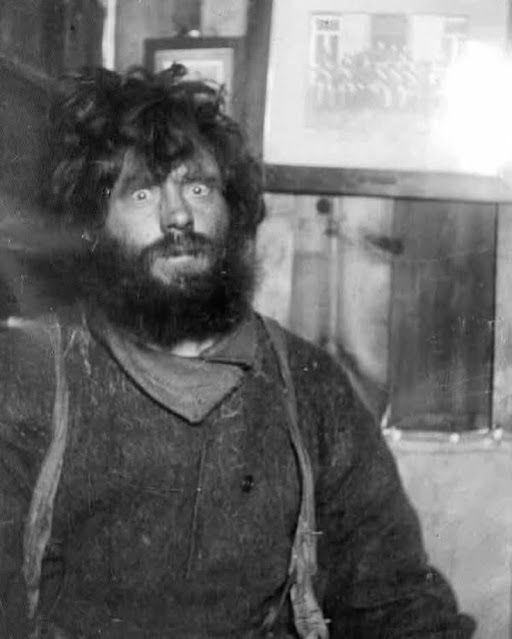
This man has seen some things. This is Danish polar explorer Ejnar Mikkelsen, as he looked to his rescuers after two and a half years of holing up in a makeshift cabin with engineer Iver Iversen. They had gone on an expedition to northern Greenland in 1909 to recover documents from an earlier expedition. When their ship Alabama was trapped in ice, the two men set out with a sled to continue their journey. When they returned to Shannon Island, they found the rest of the expedition had left with a whaling ship on the assumption that the two were dead. Mikkelsen and Iversen built a hut from wood salvaged from the ship, and survived the next two winters on seal and polar bear meat. Finally, a Norwegian whaling ship found them in 1912. Read about the Alabama expedition and the ordeal of being stranded on Shannon Island at Vintage Everyday.

A dog named Sienna was found as a stray on the streets of Altavista, Virginia. She then went into care at the Campbell County Animal Care and Control Facility, and no one came forward to claim her. Sienna was being walked at a public adoption event last weekend when she was strangely drawn to a man sitting down. He hadn't called her, and he didn't know the dog. But Sienna sat down and placed her paw on his foot. Then she pawed at his leg and sat down again. The man's wife appeared and thought the scene a big odd, then she realized that her husband was about to have a seizure. She was able to get him to their car and take care of him.
Sienna's behavior was exactly that of a dog who had been trained to detect and alert for impending seizures. But why would a dog with such training be abandoned? Is it possible that Sienna is so sensitive that she would warn a stranger even without training? At any rate, Sienna has been hailed as a hero, and she has received donations for veterinary care and several adoption applications. -via Fark
(Image credit: Friends of Campbell County Animal Control)

At the subreddit /r/StarTrek, my fellow Trekkies are playing a game of adding "...if you know what I mean" to the end of favorite lines from Star Trek.
It works rather well. Such as the above line from a scene in the first episode of The Next Generation. Or, below, one from The Wrath of Khan. The results are salacious for those of us with corrupted minds.

Learning the art of skateboarding takes courage and the willingness to fall and get up again. Imagine how much courage it takes to do that when you can't see where you are going. Dan Mancina is a blind skater who founded Keep Pushing Inc., an organization dedicated to serving the differently-abled community. He built the world's first accessible skate park in Detroit, Michigan. The Ranch is designed for blind skateboarders who use a cane, and also for those with low vision and even people who use wheelchairs. In the video above, Mancina explains some of the adaptive features of the skate park, which include Braille labeling, high contrast, and audio signals. You can see other blind skaters try the park out at Laughing Squid.
Mancina was a skater before he went blind, but then returned to the sport he loves. He is determined to open up that world to other blind skaters. Continue reading to see his story.

Hummingbirds drink flower nectar, which is heavy in sugar to meet their energy needs. But over the last century, the native flowers they depend on have become less available. So what do we do? We hang hummingbird feeders. There are constant arguments about the wisdom of hummingbird feeders, with some telling you not to do it. Honestly, planting more native flowers would be a more natural solution, but that would take years and more acreage than you can contribute.
Experts say there's nothing wrong with hanging hummingbird feeders with sugar water in them. But there are some caveats. You should avoid commercial hummingbird food preparations, especially those with red dye. And when you leave sugar water out for days, it will attract bacteria and fungi, so it crucial to keep your bird feeder clean. Read about the dangers hummingbirds face when eating from a dirty feeder, and learn the right way to do it at Vox.
(Image credit: Alhill42)
Warning: this Honest Trailer contains mature themes, meaning sex and violence. The movie Sinners opened in theaters two months ago and got rave reviews from both critics and audiences. If you had to slot it into a genre, it could be called a vampire musical. But Sinners is much more than that. Set in 1932, it incorporates the themes of religion, racism, and the blues. In other words, it's intense, and unlike anything you'd expect in a horror film. Directed by Ryan Coogler and starring Michael B. Jordan, Sinners had high expectations from the start. It's the eighth-highest-grossing film of 2025.
You can tell that Screen Junkies liked Sinners a lot, but they still manage to have fun highlighting its extreme parts. The movie's soundtrack got an awful lot of acclaim, but there's hardly any music in this video. Otherwise, this Honest Trailer is like a long trailer. Sinners is now available on home video.
Every year, Smithsonian makes recommendations for interesting small towns to visit during your summer vacation. Quite a few made the list this year because of their special anniversary celebrations. Edgartown, Massachusetts, will host Amity Homecoming Weekend, to celebrate the 50th anniversary of the movie Jaws. Why? Because most of the movie was filmed there, as Edgartown stood in for Amity Island. In Berea, Kentucky (where both my parents and both my children went to school), the Berea Craft Festival is celebrating its 35th anniversary in July, and historic Berea College is celebrating its 170th anniversary. Ticonderoga, New York, will commemorate the 250th anniversary of America's first offensive victory in the Revolutionary War at Fort Ticonderoga. Truth or Consequences, New Mexico, is marking the 75th anniversary of the day they changed the town's name for publicity purposes. Read about these and other small towns that cater to interests of all kinds in a list at Smithsonian.
Last Saturday, we posted about Ed, a pet zebra that had escaped from his home in central Tennessee. Ed is now back in the slammer, having been captured by local law enforcement, professional animal handlers, and volunteer drone operators according to WSMV 4 News.
How did they capture the zebra? The local NBC News affiliate interviewed the owners, Taylor and Laura Ford. The couple hired professional wranglers from Texas who used an off-road vehicle and a helicopter to drive the zebra. The chopper crew then dropped a net on Ed. After subduing him, the helicopter lifted him to a trailer for transportation to a more secure facility.
-via Super Punch
Have you noticed the rise of purple streetlights in your town? I haven't, but that may be because my small town is trying to look quaint and vintage to draw tourists. Purple streetlights are being noticed all across America. There must be a reason for that, like being easier on the eyes or safer. It's none of that, and and it turns out to be a pretty dumb reason. To get to the bottom of it, this video goes through the change from sodium vapor lamps on our streets to LEDs. Sure, there are a lot of advantages to LEDs, particularly in the amount of energy they use. They are certainly brighter, even though a lot of folks don't like them. LEDs use the visible spectrum of light differently in an attempt to mimic light from the sun, with less success than we'd like. The purple has been showing up only in the last few years, and it's not intentional. The good news is that LEDs are getting better all the time.
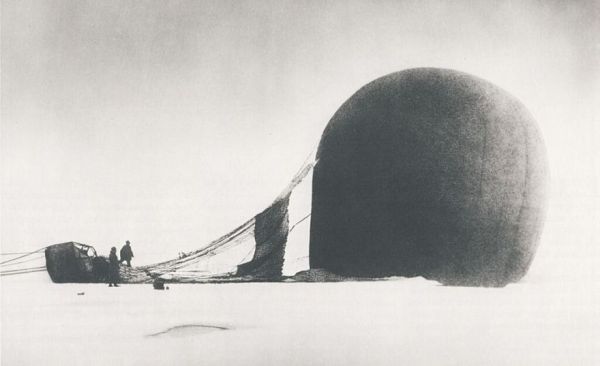
In the late 19th century, the race was on to be the first to reach the North Pole. Most expeditions used ships, sled dogs, and substantial crews and still couldn't get there. Swedish engineer Salomon Andrée had a better idea- why not just fly to the North Pole? Andrée proposed taking a hydrogen balloon to the Arctic to cut the travel time way down. His idea was to fly the balloon with long ropes that dragged against the ground to make the device more controllable, and he would steer with attached wings. The idea sounded simple, but turned out to be anything but.
Andrée and two crew members, physics professor Nils Strindberg and engineer Knut Frænkel, took off from Danes Island on July 11, 1897. Nothing went right. First, the long ropes became tangled, and had be abandoned. Then the balloon leaked hydrogen. Andrée sent reports back by homing pigeon, but then all communication ceased and the balloon crashed three days into the journey. It was in 1930 that the three men were found, far away from the balloon. The story of the Arctic balloon expedition was told in Andrée's diary and in pictures from the camera they had with them. You can read about the expedition and their desperate attempt to reach civilization at Amusing Planet.

Turn the corner while browsing through the aisles of this 7-Eleven convenience in Monterrey, Mexico, and you'll see a living tree erupting through the floor and poking out the ceiling. Mike Leavy of Mexico Listo tells us that when 7-Eleven planned its 500th store, it decided to make one that was LEED Certified--that is, built to promote environmental sustainability.
The builders found a 60-year old walnut tree on the site and decided to keep it. Additionally, the store is built from recycled materials, makes great use of natural sunlight and reduces interior lighting when not needed, and uses enthalpy wheels to regulate ventilation.
-via Atlas Obscura